AI-native, fully reflective
An AI edits the same living model you do — reading the document and the editor's own capabilities, targeting meaning, not line numbers. Like you, it can't produce an invalid edit.
AI-native · generic-purpose projectional editor
ProjecturEd keeps your document as what it really is — a tree, a table, a graph — and projects it into as many notations as you need. Edit any projection and the change flows to every other view. Humans and AI work one shared model — and neither can break it.
The idea
A conventional editor stores your work as a flat string of characters and leaves the structure — the objects, the relationships — implicit. ProjecturEd flips that around. The document is the structure. What you see on screen is a projection of it: one of possibly many notations, generated from the underlying data.
Because each projection is generated, it can be anything — a block of JSON, an indented outline, a spreadsheet, a wiring diagram, a page of formatted prose. And because ProjecturEd knows how each projection was produced, it can run that mapping backwards: your edits to the projection become edits to the data itself.
Your data is a string. Structure lives only in your head and in fragile parsing. One notation, take it or leave it.
Your data is a tree, a table, a graph. Notations are projections of it — as many as you like, each one editable, all kept in sync.
Compared
A spreadsheet gives you a grid; every other app gives you its own single way of working. Your data is forced into whatever shape the tool happens to offer — and copied into the next tool the moment you need a different one.
One model underneath; every view — grid, outline, form, diagram, dashboard — is a projection of it. Pick the one that fits, or build a new one. Nothing is duplicated, and every view stays in sync.
The assistant writes characters and hopes the software reads them as intended. Structure is guessed after the fact, and breaks when the guess is wrong.
The assistant works the same model you do — changing objects, relationships, and diagrams directly, never strings. Same operations, same model, same truth for you and the AI.
Capabilities
An AI edits the same living model you do — reading the document and the editor's own capabilities, targeting meaning, not line numbers. Like you, it can't produce an invalid edit.
Put any content inside any other — a formula in a table cell, JSON inside prose. Navigation and editing cross the seams, and any fragment is a full document on its own.
Notations compose like functions — chain them into pipelines, nest, sort, filter, or focus. Composition is predictable and well-defined: a sorted or filtered view is still fully editable, because each layer maps your edits back through the one beneath it.
The same editor, unchanged, in a native window, a terminal, or the browser — or headless, exporting print-quality PDF and images. Run it from source, or as a single standalone binary.
You edit the model directly, so you can't type a syntax error and the caret never lands anywhere meaningless. What's on screen is always the truth.
Only what changed is recomputed, and only what's on screen is ever drawn — a ten-thousand-row document stays instant. Reactivity is fine-grained and opt-in: static, mutable, and reactive values mix freely, so you pay only for what truly has to recompute.
Drive any session from a script, then capture it — live playback, headless screenshots, and recorded video, with no display required.
A comprehensive automatic test suite exercises every projection, reader, and domain — built to rule out whole classes of errors, not chase them one at a time.
A selection points at a thing, not a stretch of characters — a spot between two letters, an XML attribute, a function argument, a table column, a whole chapter. It always knows where it is and what it means, so anything on screen can be selected and acted on.
Beyond ordinary copy and paste, you can note a piece and paste it by identity: it then lives in many places at once as literally one and the same thing, not duplicates. Edit it anywhere and every place changes together — and it's reclaimed automatically once the last use is gone. Almost no editor lets you do this.
Add your own domain and its projections — in your own project, or contributed back — and the rest already knows how to nest, navigate, and edit it. No forking, no central registry, so it scales cleanly across many collaborators.
Ask what you can do right here and get a real answer: the actual operations available at the current selection, in the current context — not a static cheat-sheet you have to translate for yourself.
AI integration
An assistant here isn't a plugin off to the side — it works the very same document you do. Because every action is an inspectable operation on shared structure, it sees the whole picture and changes it exactly the way a person would.
The bigger idea
Because the assistant can build documents and views as fluently as it edits them, the interface itself becomes something you assemble on the fly. A dashboard stops being a fixed layout and turns into a real desk: you and the assistant lay out exactly the notations, tools, and data the task in front of you needs — and rearrange them the moment the task changes.
The live document, the operations available right now, the projections in play, the editor's own interface — all of it is readable at runtime. The assistant discovers what it can do by inspection and self-documentation, rather than guessing.
The assistant needs exactly one instrument — it runs code. Every change, whether to the data, the views, or the editor itself, is made by executing it, inside a sandbox that keeps the session safe.
The assistant edits the data and the projections that present it: swap a notation, add a sorted or filtered view, restructure a document. Manipulating documents and their views is native, not a bolt-on.
The exchange with the assistant is itself a document, and it can hold whatever the two of you put there — a table, a formula, a diagram, a fragment of code — produced by the assistant or dropped in by you.
Typing text character by character is the exception now, not the rule. You say what you want and let the assistant carry it out — then step in and edit directly, anywhere, whenever you choose.
There is no separate "AI mode." Anything you can do, the assistant can do; anything it can do, you can do. One shared vocabulary of operations drives both.
See it in action
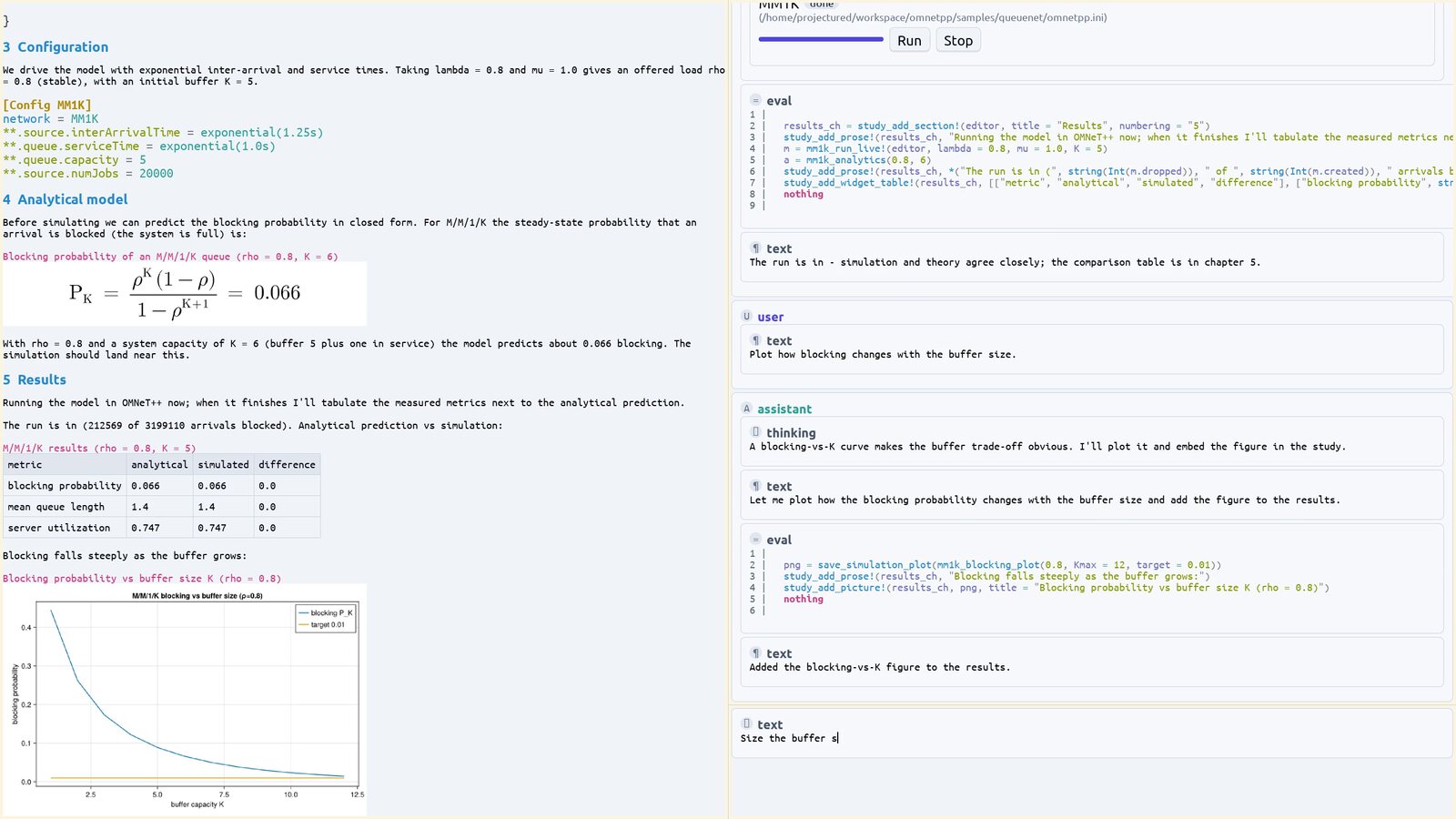
The current editor building an M/M/1/K queueing study end to end — prose, an OMNeT++ model, a running simulation, and its results — composed live and driven by the built-in assistant.
Examples
Each one is a real document or projection, rendered by the editor itself. The code shown is the interesting part.
Animation for free: each coordinate is a cell that reads the clock, so the whole scene redraws itself every frame.
# each animated value is a cell that reads the editor's clock,
# so the scene re-renders every frame
dot = GraphicsCircle(
    () -> cx + r*cos(angle(get_reactive_time(clock))),
    () -> cy - r*sin(angle(get_reactive_time(clock))),
    7, color_solarized_magenta)

GraphicsCanvas([background, ring, sin_chart, cos_chart, dot]; w, h)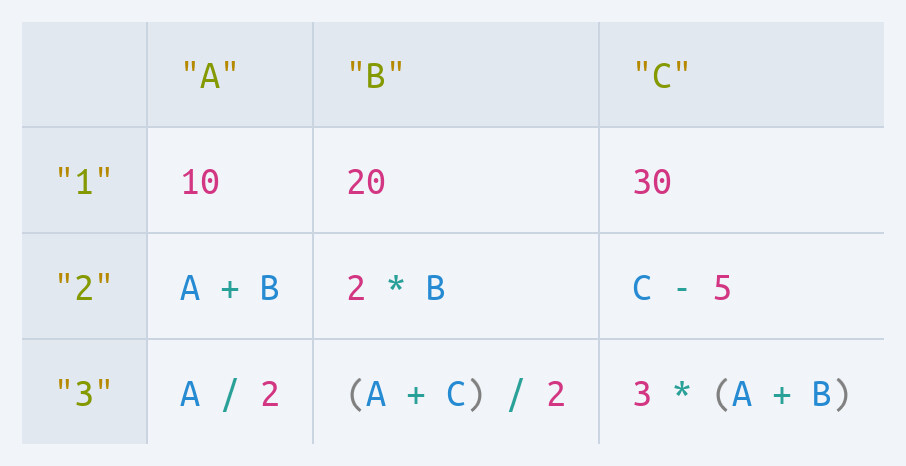
Cells aren't just values — they can be formulas that recompute as you edit. A table domain and a math domain, composed.
# a table widget whose cells can be live math, not just values
WidgetTable(Point2D(40, 40),
    [PrimitiveString("A"), PrimitiveString("B"), PrimitiveString("C")],
    [PrimitiveString("1"), PrimitiveString("2"), PrimitiveString("3")],
    [[PrimitiveNumber(10), PrimitiveNumber(20), PrimitiveNumber(30)],
     # formulas, re-evaluated as you edit:
     [MathBinaryOperation(:+, MathVariable("A"), MathVariable("B")),
      MathBinaryOperation(:*, PrimitiveNumber(2), MathVariable("B")),
      MathBinaryOperation(:-, MathVariable("C"), PrimitiveNumber(5))]])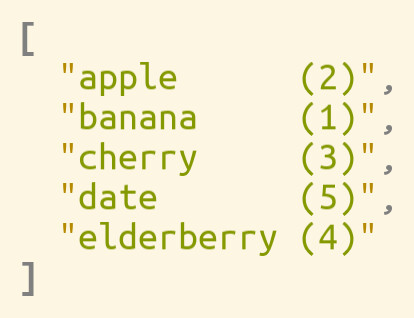
A sorted view is one extra projection in the pipeline. Remove it and the original order is back — nothing was mutated.
# a sorted view is just one more projection in the pipeline —
# the underlying list is never reordered
ChainingProjection(
    SortingProjection(by = x -> x.value),
    # … then render the collection as text …
)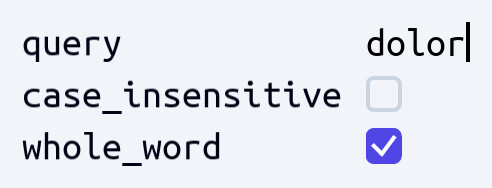
Point the reflective projection at a plain struct and get an editable form — text fields, checkboxes — with no UI code.
# reflected into a form: the String becomes a text field,
# each Bool a checkbox — no interface code written
@document struct SearchSettings
    query::String
    case_insensitive::Bool
    whole_word::Bool
end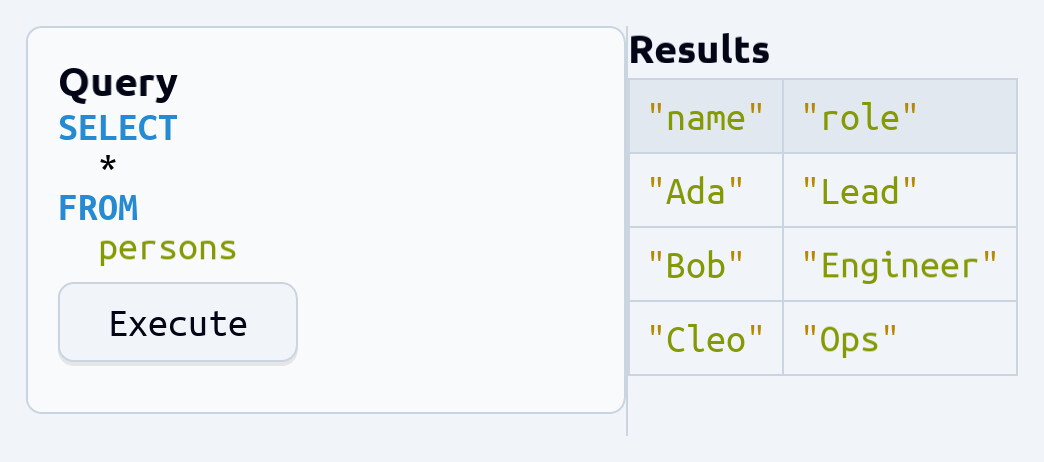
Widgets and SQL in one document — the query and an Execute button on the left, its results table on the right. A split pane, a card, a button, a table, and a live SQL statement, composed together.
# a query tool from widgets + SQL — one document, both domains
WidgetSplitPane(:horizontal, [
    WidgetCard(title = "Query", content = CellVector([
        SqlSelectStatement("persons"),          # SELECT * FROM persons
        WidgetButton(Point2D(0,0), Point2D(120,40), "Execute")])),
    WidgetTitlePane("Results",
        WidgetTable(["name", "role"], [],
            [["Ada", "Lead"], ["Bob", "Engineer"], ["Cleo", "Ops"]]))])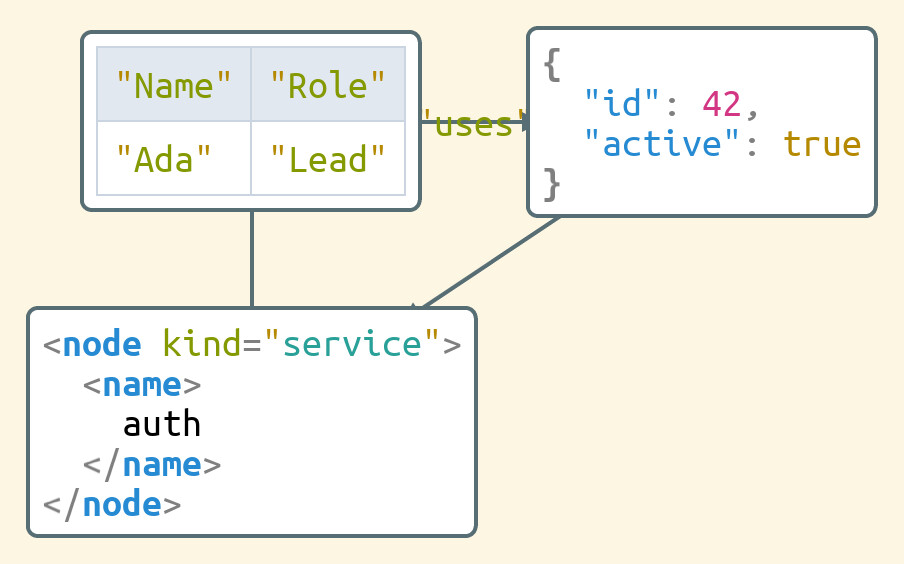
Describe vertices and edges; it places the nodes and routes the connections for you. Each node here is a whole document in a different domain — a table, some JSON, an XML element.
# nodes are whole documents — a table, some JSON, an XML element;
# describe vertices and edges, the layout & routing are automatic
v_table = GraphVertex(table)   # table :: WidgetTable
v_json  = GraphVertex(json)    # json  :: JsonObject
v_xml   = GraphVertex(xml)     # xml   :: XmlElement

GraphGraph(
    [v_table, v_json, v_xml],
    [GraphEdge(v_table, v_json; directed=true, label="uses"),
     GraphEdge(v_json,  v_xml;  directed=true),
     GraphEdge(v_table, v_xml;  directed=false)])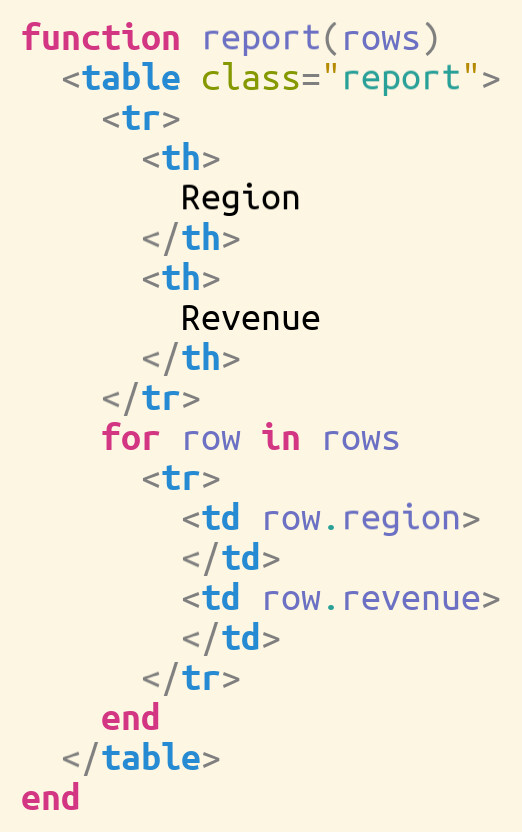
A Julia function whose body is an XML table — and the rows are a Julia loop. One document nests Julia ⊃ XML ⊃ Julia, each level editable in place. Server-side templating, without the string-mashing.
# Julia and XML document constructors, combined into one tree
# (the editor renders it as the syntax shown alongside)
JuliaFunction(JuliaIdentifier("report"), [JuliaIdentifier("rows")],
  JuliaBlock([
    XmlElement("table", [XmlAttribute("class", "report")], [
      XmlElement("tr", [XmlElement("th", [XmlText("Region")]),
                        XmlElement("th", [XmlText("Revenue")])]),
      JuliaFor([JuliaForIterator(JuliaIdentifier("row"),
                                 JuliaIdentifier("rows"))],
        JuliaBlock([
          XmlElement("tr", [
            XmlElement("td", [JuliaFieldAccess(JuliaIdentifier("row"),
                                               JuliaIdentifier("region"))]),
            XmlElement("td", [JuliaFieldAccess(JuliaIdentifier("row"),
                                               JuliaIdentifier("revenue"))])])]))])]))
Catalog
A document lives in a problem domain; a projection turns it into a notation. Both are open sets you extend — and because projections compose, any combination is fair game.
Stack them freely. Each notation builds on the ones beneath it — reusing their layout and their editing behaviour — so a sorted, filtered, or searched view stays fully editable, even in the middle of a nested search.
Lineage & status
ProjecturEd began as an open-source editor written in Common Lisp — its source is public, and you can still watch it in action. The current editor is its successor: rebuilt from the ground up, far more capable, and in active development.
The successor is, in its own way, a proof of the thesis: roughly seventy thousand lines built entirely through disciplined, AI-assisted development and automated self-testing — not one of them written by hand.
It runs today across native, terminal, and browser. If projectional editing is something you think about too — as a user, a builder, or a fellow traveller — get in touch.